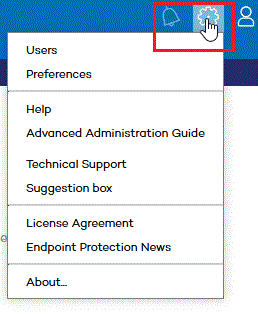
This button displays a drop-down menu with the general settings options described below:
Lets you create new users with different access permissions to the Web console.
Lets you change general settings regarding the operation of the console. Click here for more information.
Contains the console's context-sensitive Help. Press F1 to display the help topic associated with the current window.
Lets you download the Advanced Administration Guide.
Advanced Reporting Tool User Guide. Advanced Reporting Tool is an advanced, real-time service that allows organizations to exploit the knowledge gathered by Adaptive Defense and Adaptive Defense 360.
Panda Remote Control Administrator's Guide. Panda Remote Control is the name of the tool developed by Panda Security to allow you to access your network computers remotely from your Web console.
Lets you contact Panda Security's technical support department to report incidents and find answers to your questions.
Lets you send comments and suggestions for improvement to Panda Security's Product Department.
Displays the product's EULA.
Use this option to get detailed information about the main new features included in each Endpoint Protection version.
Shows the version of the different service components.